MS Teams
Microsoft Teams for Mac on AVD & Windows 365: SlimCore Optimization is Now in Public Preview
If you know me, you know: I’ve been using Mac in my personal life since 2006. Not because I’m an Apple fanboy, but simply because it’s the better tool for me. And if you’re familiar with the EUC world, you also know that hasn’t always been straightforward. macOS has traditionally received new features a little later than Windows. With solutions like Microsoft Azure Virtual Desktop (AVD) or Windows 365, accessing corporate environments from a Mac has become quite solid, and here too, things have improved massively over the last few months.
But when it comes to Microsoft Teams in a VDI environment, Mac users like me have been at a slight disadvantage in recent months. On Windows, Teams optimization with AVD has worked reliably for years. On Mac, however, you were stuck with the older WebRTC-based optimization, missing out on features that Windows users had long enjoyed. That is now changing, starting with a Public Preview.
What’s behind it?
With the new VDI solution for Teams (also referred to as “VDI 2.0”), Microsoft has replaced the existing WebRTC-based optimization with a new media engine called SlimCore, the same engine already powering the native Teams desktop client for Windows. The goal is clear: true feature parity between the native and virtualized Teams client, regardless of the endpoint device.
For Windows endpoints, SlimCore has been generally available since late 2024. Since early 2026, support for macOS endpoints is now in official Public Preview, for AVD and Windows 365 environments.
The official reference: Microsoft 365 Roadmap ID 502524 and the Microsoft Learn documentation for the new VDI solution.
Important: MAU version, not the App Store
There is one key detail here that is easy to miss:
MAU stands for Microsoft AutoUpdate, Microsoft’s update mechanism for macOS apps. The MAU version of the Windows App is obtained directly from Microsoft, not through the App Store. If you have been using the App Store version, you will need to switch to get the new optimization. The minimum required version is Windows App for Mac 11.3.2.
Prerequisites at a glance
| Component | Minimum version |
|---|---|
| Windows App for Mac (MAU version) | 11.3.2 |
| Microsoft Teams in AVD/W365 | 24193.1805.3040.8975 |
Enabling Public Preview: Admin steps
Public Preview is enabled via a Teams Update Policy in the Teams Admin Center, the same mechanism used for all Teams preview features.
... > Settings > About Teams > Early access, enable Public Preview and restart Teams when prompted.
How do I verify the optimization is active?
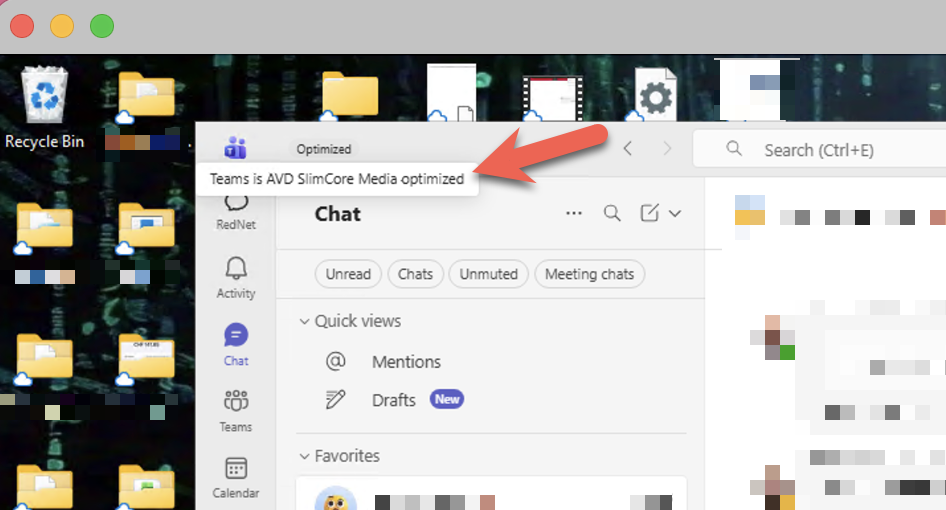
In the virtualized Teams client, navigate to ... > Settings > About Teams:
AVD SlimCore Media Optimized
New optimization active. All good.
AVD Media Optimized
Legacy WebRTC optimization active. Not yet on SlimCore.
AVD Media not connected
No optimization active.
Newer Teams versions also display a VDI status indicator directly in the top-left corner of the UI, no more digging through settings.
Conclusion
For Mac users in AVD/Windows 365 environments, this is a real step forward. The SlimCore optimization brings features like 1080p video, Gallery View 3×3/7×7, hardware acceleration, and significantly better performance, all things Windows users have known for a while. I’m genuinely pleased to see this finally coming to Mac.
It’s a Public Preview for now, so test it with appropriate expectations. But the direction is right.
Official links
📄 Microsoft Learn: New VDI solution for Teams
🗺️ Microsoft 365 Roadmap: ID 502524
All information in this article is based on publicly available information from Microsoft.

